mhd-iti65 component
The mhd-iti65 component provides interfaces for actors of the Provide Document Bundle IHE transaction (ITI-65), which is described in the IHE IT Infrastructure Technical Framework Supplement, Mobile Access to Health Documents (MHD), Section 3.65.
Actors
The transaction defines the following actors:
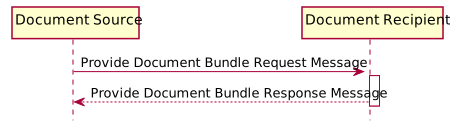
Producer side corresponds to the Document Source actor. Consumer side corresponds to the Document Recipient actor.
Dependencies
In a Maven-based environment, the following dependency must be registered in pom.xml:
    <dependency>
        <groupId>org.openehealth.ipf.platform-camel</groupId>
        <artifactId>ipf-platform-camel-ihe-fhir-r4-mhd</artifactId>
        <version>${ipf-version}</version>
    </dependency>
Endpoint URI Format
Producer
The endpoint URI format of mhd-iti65 component producers is:
mhd-iti65://hostname:port/path/to/service[?parameters]
where hostname is either an IP address or a domain name, port is a number, and path/to/service represents additional path elements of the remote service.
Consumer
The endpoint URI format of mhd-iti65 component consumers is:
mhd-iti65://serviceName[?parameters]
The resulting URL of the exposed FHIR REST Service endpoint depends on the configuration of the deployment container.
Consider a Tomcat container on host eHealth.server.org is configured in the following way:
port = 8888
contextPath = /IHE
servletPath = /fhir/*
Then the mhd-iti65 consumer will be available for external clients under the URL
http://eHealth.server.org:8888/IHE/fhir.
URI parameters controlling the transaction features are described below.
Example
This is an example on how to use the component on the consumer side:
    from("mhd-iti65://service?audit=true&secure=true")
      .process(myProcessor)
      // process the incoming request and create a response
Streaming uploads
An ITI-65 request contains a transaction Bundle whose Binary resources carry the
documents inline as base64. For large documents, HAPI would hold several copies of each document on
the heap while parsing. Since IPF 6.0, the consumer side can split the document content out of the
request body into memory or a temporary file before the body is parsed. This is off by default and
is enabled in Spring Boot with ipf.fhir.streaming-upload.enabled=true.
With streaming enabled, Binary.data of a large upload holds a short marker instead of the
document. Your route must exchange it for the content through StagedContentRegistry, and must
consume it before the response is sent. See FHIR Binary streaming uploads for details, the
configuration properties and the disk space needed for temporary files.
Basic Common Component Features
FHIR Component Features
- Message types and exception handling
- Security
- Advanced FHIR Parameters
- FHIR Binary streaming uploads